Screenshot it,
the event lands in your calendar.
Hand the time and place buried in a chat message, event poster, meeting notice, or email invite to AI — it reads them into a structured event. Confirm or tweak, then write it to your usual calendar in one tap. No more typing it all in by hand.
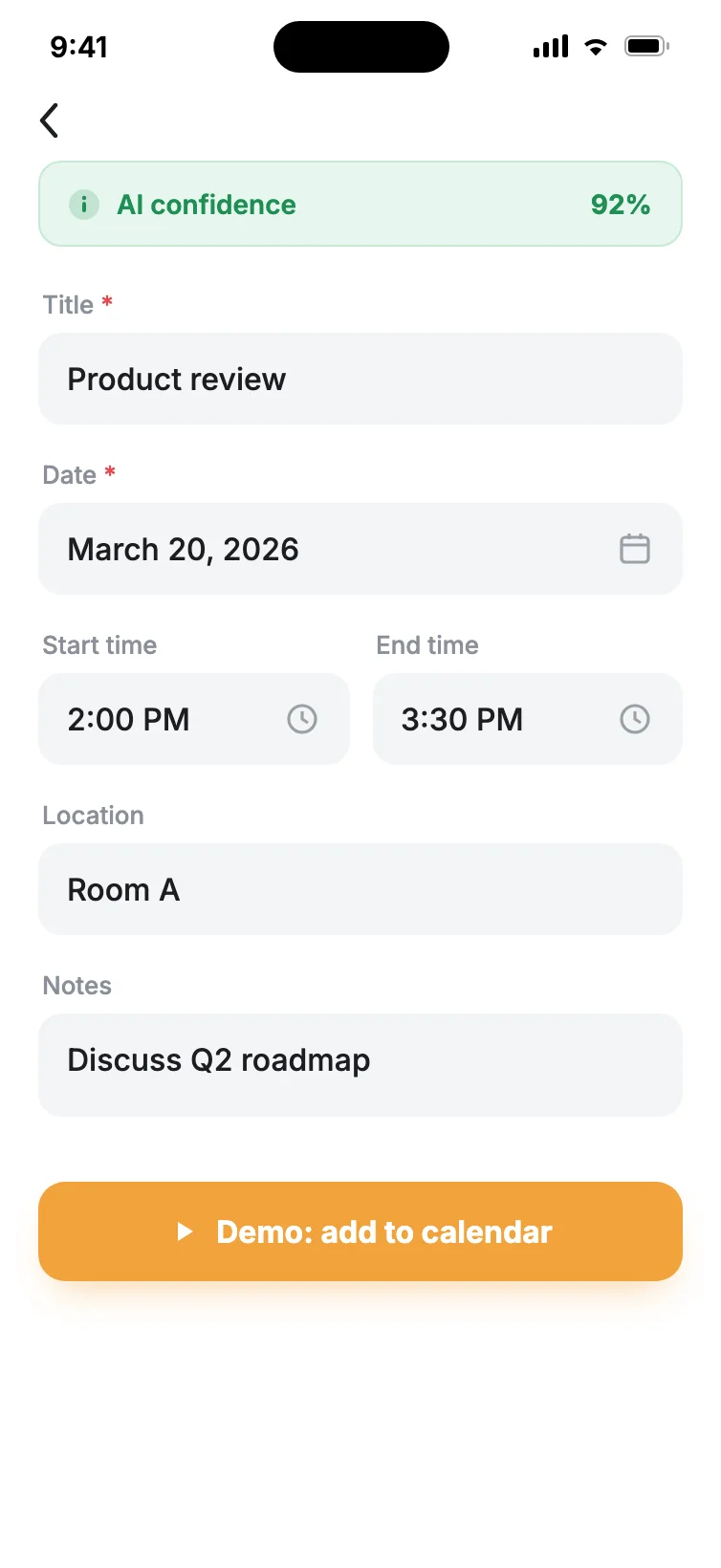
It's not just OCR copy-paste: it actually understands the casual, real-world phrasing in group chats, posters, and email invites, and one read writes in parallel to Feishu and Apple Calendar — a combo you rarely find: it reads casual phrasing and writes once into every calendar you use.
What it does for you
Screenshot to event
Pick a screenshot with timing in it and AI pulls out the title, date, start and end times, location, and notes — barely any typing required. For chat screenshots, the title is organized as person · company · topic, so you see whose meeting it is at a glance.
Reads casual phrasing and messy layouts
Built to parse chat threads, posters, video-call invites, and email invitations — even loose phrasing like "next Wednesday afternoon" or "this Friday" lands on the right date.
One read, every calendar synced
Works with your iPhone's Apple Calendar and Feishu. Read once and it writes to both in parallel — if one fails, the other still goes through. Added Google or Outlook under iPhone Settings? Those show up inside Apple Calendar too.
Editable results, transparent confidence
Each result carries an AI confidence flag, and every field is editable before you confirm — so a wrong time never slips straight into your calendar.
Straight from Share Sheet & Shortcuts
No need to open the app — send a screenshot to SnapCal right from any app's Share Sheet or an iOS Shortcut, down to a single tap.
On-device text recognition
OCR runs locally to keep data from leaving your device, and you can try the core reading flow without ever creating an account.
Screenshot it, leave the rest to AI
Pick a screenshot
Choose a screenshot with event details from your library, or send it straight to SnapCal from any app via the Share Sheet or a Shortcut.
AI reads it
On-device OCR plus AI parsing pull out the title, date, start and end times, location, and notes in about 1.5 seconds — nailing the common cases in one go.
Confirm or tweak
Check the AI confidence on the results page, edit any field you like, and only move on once it's right.
One tap to calendar
Pick your target calendars and one tap writes to Feishu and Apple Calendar in parallel — then jump straight in to take a look.
When it earns its keep
Meetings dropped in a group chat
A coworker fires off "product review Thursday 10am, Room A" in the group. Screenshot it to SnapCal and it becomes a calendar event with the location filled in — for chat screenshots, the title is organized as person · company · topic, not a vague "catch up."
Grabbing dates off a poster
Spot an expo, talk, or show poster, screenshot it to read the time and place, and skip the chance of copying the date down wrong.
Work and personal calendars at once
Feishu for work, Apple Calendar for life — one meeting screenshot writes to both at the same time, no switching back and forth to enter it twice.
What it costs
Free
10 reads a month, the full core feature set, no subscription needed to get started.
Monthly
Unlimited reads, billed monthly — flexible, pay as you go.
Annual
Same unlimited reads, billed yearly for the better deal.
Subscriptions are managed through the App Store and can be cancelled anytime.
You might be wondering
What if it reads something wrong?
Every result comes with an AI confidence flag, and the title, date, time, location, and notes are all editable before anything reaches your calendar. The event is only created once you confirm it's right.
Which calendars does it support?
Your iPhone's Apple Calendar and Feishu — a single read writes to both. If you've added Google, Outlook, or other accounts under iPhone Settings → Calendar, SnapCal can write into those too, since they show up as part of Apple Calendar.
How much can I do on the free plan?
The free plan covers 10 reads a month. For unlimited, subscribe at $1.99/month or $9.9/year (roughly 58% less than monthly).
Do I need an account? Is my data safe?
You can try the core reading flow without signing up. Text recognition (OCR) runs on your device to keep data from leaving it, and your captured data is never sold.
Let AI put it in your calendar now.
10 free reads a month; go unlimited at $1.99/month or $9.9/year (about 58% off).
Five more tools from Gatheon — all built on the same local-first, findable-again principles.
Shoot it and forget it — one word brings it back.
Auto-sorts your screenshot pile — a receipt before you delete.
Hold to talk; real-time transcription into usable text.
Screenshot is save — every shot stays findable
Just do your work — files file themselves